Showing posts with label deliverables. Show all posts

Sunday, January 24, 2016

Loudness

So a thing which concerns me is that I think in the future we're going to start seeing demands for ATSC A/85 loudness standards in deliverables.
But we do care. We care so much.

Now for them of us in the indy world, there's frequently some allowances for certain standards which exist in the big network TV world which we get to slide by. But I don't think the international loudness standards are going to be one of those things.
So I want to be ahead of the... 8-ball? Curve? Whatever it is one needs to be ahead of to make sure we're delivering masters which are compliant to CALM act and that sort of thing.
The high-end version of the audio mixing/editing software I use (Samplitude) is called Sequoia. It is comically expensive (almost $3000). But it has built-in tools for decent loudness metering.
There are cheaper LUFS meters, but not necessarily what one is looking for in the way of broadcast audio.
In any case, measuring A/85 or any of the other loudness standards is... weird. You're measuring an average of an average of a level but only within a certain frequency range and only when the signal is above a certain level. Right? Because loudness is a subjective thing and making a meter to measure it is a pain in the tuchus.
Dig this (from the above TC Electronics link):
Target levels are specified in various broadcast standards, but only vary slightly. For instance, the ATSC A/85 standard recommends a target of -24 and uses the LKFS term, whereas the EBU R128 standard sets the target level at -23 and uses the LUFS term. One of the reasons for this difference is that the R128 standard employs the above-mentioned gate, which in effect makes most measurements equivalent to -24 LKFS/LUFS without the gate - yet more useful for aligning loudness across genres.
Yup. The broadcast standards are sort of difficult to get one's head around. But it's doable. And if we can guarantee the deliverables (which I imagine might be important for VOD) it will help.

Tuesday, December 2, 2014

144 Hours

Having just finished John Purcell's wonderful book on dialog editing I've come to a thinking. Suchwise:

I think the fundamental difference between the way dialog is edited on big features and the way we have to do it is that on big movies the M & E's come second, with the English-language mix coming first.
We really can't afford to work that way. Our M & E's have to really and truly sound just like the English language full mix -- just without any actual dialog in them. And they are a first deliverable, not something we can wait on if and when more money mysteriously arrives.
So for us doing a dialog edit is really doing the prepping for the Music and Effects mix.
What this basically means is that the dialog tracks themselves get stripped and noise-reduced down to their barest elements. Ruthlessly so.
See, normally a dialog editor works on making a smooth dialog track by fading in and out of each microphone, and leaving the tone up between pieces of dialog so the scene has no jarring cuts of background tone coming in and out.
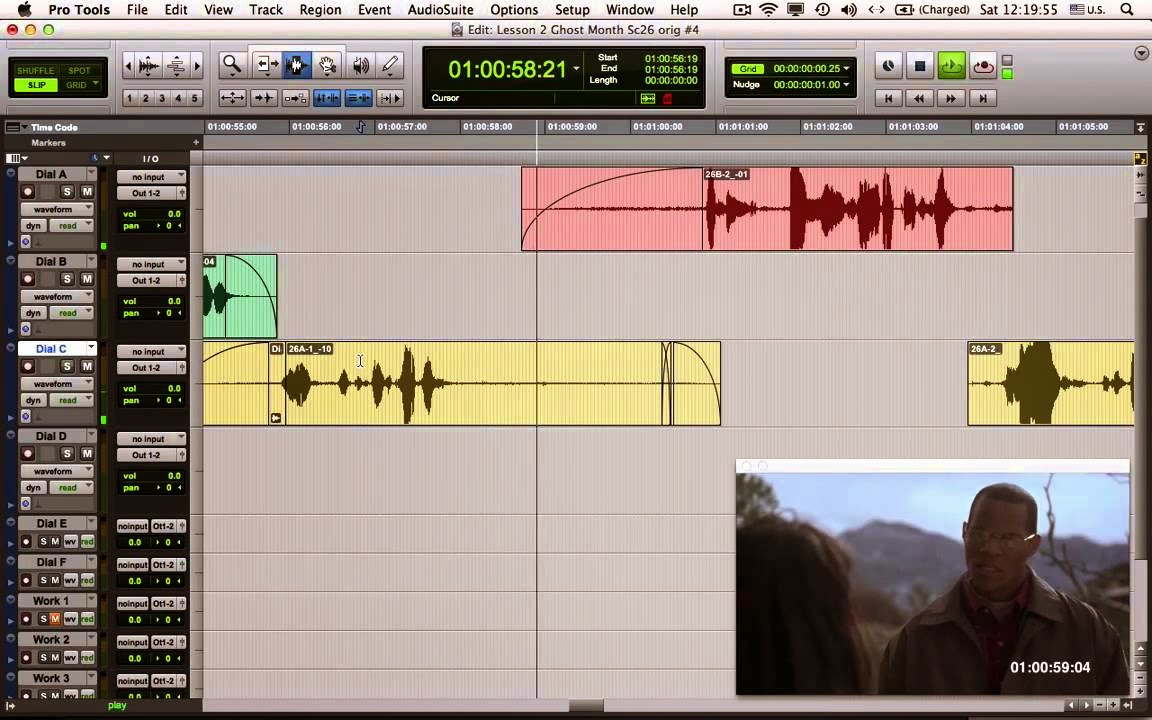
Big crossfades between dialog tracks are fine, but how do you build an M & E out of this?

Then they fill the spots in-between with room tone.
This doesn't work for me. Why? Because what happens when you mute those dialog tracks?
The scene's audio disappears. All you have left is your Foley and any sound effects you've cut in.
Now, there's a thing called the P-FX track. That's where you put all your production sound effects which the mixer may or may not use.
But the fact is we can't deal with waiting around to try to figure out how to make the mix work without the dialog after the fact.
So what I say is:
1. Strip that dialog clean with dead-on noise reduction and then add room tone to the entire scene.
2. Those "PFX" tracks? turn them into actual effects tracks. Make a decision then and there (during the dialog edit) what production sounds are going to be sound effects in the movie. Drag those production effects down to one of your sound effects tracks.
3. If you're going to use room tone from the actual scene and loop it, that's fine. Just deal with it right then.
4. Now, during the dialog edit, you need to decide on sound effects during the scene in order to make the scene work. Why? Because some of those sound effects will have to sit on top of the dialog. In order to know if your M & E's will actually work you have to deal with that immediately.
5. The PFX track gets a new function -- it (or they) is/are muted while running off the full English mix. This is because the only thing on the PFX track are sound effects which take place right on top of dialog where the dialog track already has the effect on it.
For instance, if you're happy with a line of dialog where the actor says his line but also scuffs his shoe at the same time, you'll need to put another "clean" shoe scuff at the same place on the PFX track. This way when you mute the dialog tracks and unmute the PFX track, the scuff will appear in the same place, just without any dialog over it.
Obviously this isn't the ideal way to handle dialog tracks so I try not to use any of these kinds of PFX tracks if I can help it.
As unbelievable as it may sound to someone who has no idea what I'm talking about, the above system actually does make sense. But what it means is that the person doing the dialog edit on a reel is also making sound effects decisions on that same reel. Because every edit in the dialog requires a careful consideration of the Music and Effects tracks (well, really just the Effects tracks).
This means that a "dialog editor" has to have a bank of sound effects available. They have to have a sampler and a keyboard available. They probably need to have a recording booth available. All to do the "dialog" edit.
Are there effects that can be done as a "second pass" or by another person at another time? Yes. Yes there are.
For instance, any noises created by a CG element like a dinosaur or robot can be presumed to not exist on the dialog tracks so one need not worry about them while preparing the dialog tracks.
Footsteps which don't exist in the production tracks (especially in scenes which were shot MOS.)
So, how many hours should this take? I'm glad you asked. The answer is 144 hours.
That's three days for all the dialog editing (including ADR), all the sound effects (including Foley), on each 10-minute reel for a 90-minute movie. Some reels will take a bit longer, some a bit shorter. And of course you'll schedule your ADR to happen in chunks so you will be spreading the ADR recording over a few weeks. But basically? 144 hours.
Me? I'm gonna write all of this up and put it in our Wiki.


Monday, April 22, 2013

CALM Down

You are utterly fascinated by relative broadcast levels of dialog, aren't you? Yes. Yes you are. 
The Angry Sound Professional explains the CALM act and what it really means. Here's part 1.
We used to have one of these jackets. It was stolen out of my car. 
In part 2 we go deeper into the meaning of dialnorm as Vince Tennant explains how the Act works. I suspect that part 3 will show how the act doesn't work but we're still waiting.

Sunday, September 16, 2012

Must Needs Be Done

It's funny, completing a feature film is a monumental effort -- thousands of man hours of work and the willingness to see the movie through the end of its process no matter how you're feeling about the movie on a given day. 
But the actual delivery requirements can be... daunting. You think you're all done with color-correcting, with eliminating matte lines and cleaning up dialog tracks and then --
-- And then you have to deal with a LOT of paperwork.
Now don't get me wrong. I'm not complaining. In fact there's a Federal injunction against me complaining about anything because, after all, I'm allowed to direct feature films for (a poor) living.
But I thought it would be amusing to post the sorts of delivery items one must produce in order to get North American distribution.
Note that all deals are unique and different. And this one particular distributor is more picky. Ironically the requirements for North America have become more legally detailed for low-budget indy pictures in the last few years due to the heady deep-pockets liability inherent in the big VOD services -- they're sticklers for every "i" being crossed and "t" being dotted.

Documentation
  1. Screenplay
  2. Composers Agreement
  3. Sync & Master Use License agreement
  4. Paid Ads statement  ( On your letter head, detailing which actors/above the line crew get what credit, in what order, etc )
  5. Dubbing Restriction ( On your letterhead, detailing if there are any dubbing restrictions.)
  6. Director & Producer agreements  ( - similar to the writer's agreement)
  7. Title Search report .  ( You can use someone like  http://www.suzyvaughan.com/  who is half price of Thomson Compumark )
  8. Copyright report (it's possible this may not be required)
  9. Stock Footage statement ( On you letter head, detailing if there is any stock footage in the movie and if so, where it comes from and legal rights to use it. )
  10. Chain of title document
  11. Trailer Usage.  ( A statement on your letter head that says there are no restrictions with actor usage in the trailer )
  12. Copyright FORM PA  Script and Movie

Friday, November 4, 2011

Nathan Vegdahl on Delivery and Intermediate Formats

You know, if you make features and (bless your little heart) are actually able to sell them, you're going to run into these issues at some point. How the heck do you deliver your movie?

Here's Nathan Vegdahl's notes to me:

"Just read your blog entry here:
http://blog.pandoramachine.com/2011/10/openexr.html

"OpenEXR is great as an intermediate format but it's not really a delivery format. OpenEXR is intended for cases where you are still going to do further image processing on the content (e.g. compositing, color grading, etc.). But as a final delivery format it is quite excessive.

"A closer equivalent to ProRes would be h.264. In fact, if we look at the complete standard http://en.wikipedia.org/wiki/H.264/MPEG-4_AVCit supports everything ProRes does and more. If you use only
intra-frame encoding then h.264 is a fine choice even for video editing, and you can do not only 4:2:0 and 4:2:2, but even 4:4:4 (i.e. full color information). In fact, h.264 can even be completely lossless(!).

"Unfortunately, most software only supports subsets of the larger standard, and so advanced features like lossless compression and 4:4:4 chroma are not widely supported (e.g. Apple's h.264 support does not handle lossless compression or 4:4:4 chroma). But even with just the baseline profile (which is supported freakin' everywhere), it can still make a decent delivery format. You just have to know what you're doing with the encoding parameters.

"Anyway, food for thought. If you'd like to know more about my encoding workflow, I would be happy to go more in-depth. I use ffmpeg to do all of my final delivery encoding, because it gives me precise control over the encoding process."

Drew: Boy, I wish h264 supported alpha channels.

Nathan:
"Technically it can, through use of an "auxiliary color channel". But decoders are allowed to ignore it in all of the profiles, so for all intents and purposes it is indeed unsupported.

"But if you really needed to, you could always encode a second video in 4:0:0 (a.k.a. grey-scale, which is also supported by h.264) that represents the alpha channel. Then in any decent compositing app you could re-merge the two streams. However, that's precisely the kind of situation where you would want to use OpenEXR anyway.

"IMO, neither ProRes nor h.264 should be used as intermediary formats for compositing. So I don't think it's a biggie that they don't support alpha channels, since that's not the stage of production they should be used for anyway. ProRes is an NLE codec, h.264 is a delivery format."